
This guide explains Static vs Dynamic Website in practical terms so business owners can understand the differences, benefits, limitations, and use cases before investing in development.
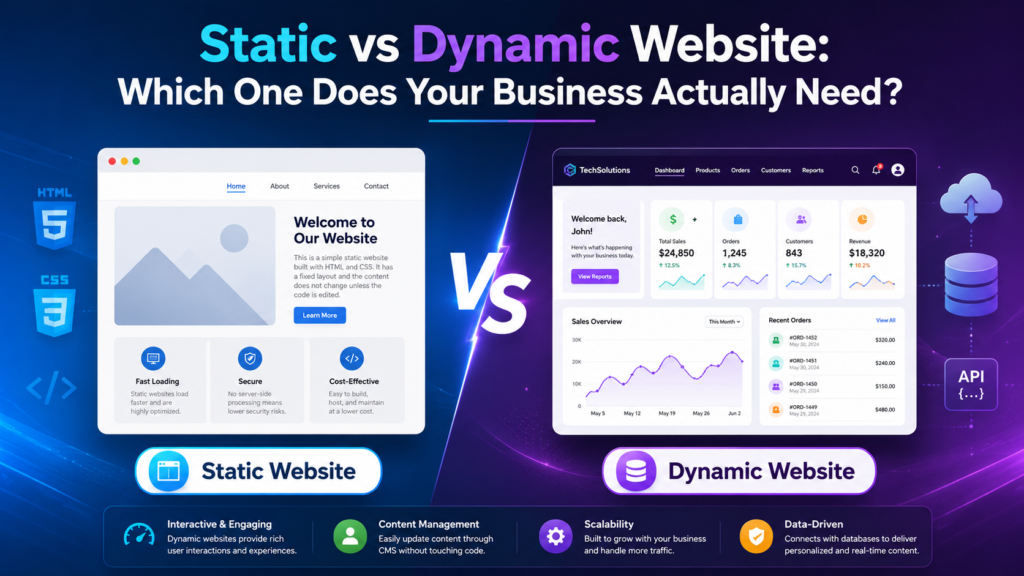
Choosing a website structure is one of the first decisions a business makes when planning a new online presence. At first, the choice may appear technical, but it affects much more than code. It can influence cost, speed, security, content management, search visibility, maintenance, and how easily the website can grow. That is why understanding Static vs Dynamic Website is important before development begins.
A small company with five service pages may need something very different from an online store, membership platform, property directory, or news website. Both static and dynamic approaches can produce professional, responsive, search-friendly websites. The right choice depends on what the business needs visitors and staff to do.
A static website is made from pages that are prepared in advance and delivered to visitors largely as stored files. When a user opens a page, the server normally sends the same core HTML, CSS, images, and other assets to that visitor unless the files themselves have been changed.
The word “static” can sound as if the website must be plain or outdated, but that is not true. A static site can include modern layouts, responsive design, videos, animations, contact forms, interactive menus, maps, calls to action, and strong branding. The term mainly describes how the content is produced and delivered.
The MDN Web Docs introduction to server-side websites explains the difference between sites that return stored files and those that generate content dynamically on the server. It is a useful technical reference for understanding what happens behind the browser.
In the Static vs Dynamic Website discussion, static development is often attractive when a business has a small number of pages, content changes rarely, and there is little need for database-driven functionality.
A consultant, local contractor, small agency, event website, campaign landing page, or professional portfolio may be perfectly suited to this approach.
A dynamic website can generate or change content using databases, content management systems, user information, server-side logic, APIs, or other data sources.
Instead of manually creating every page as a separate file, the website can use reusable templates and stored information. A blog, for example, can use one article template while loading the title, author, content, image, category, and date from a database.
E-commerce stores are another common example. Product prices, stock levels, categories, customer accounts, carts, orders, and recommendations may all change without a developer manually rebuilding each page.
A content management system such as WordPress also makes this process easier for non-technical teams. The WordPress Documentation explains how site owners can manage pages, posts, media, users, and other website content through an administrative interface.
When comparing Static vs Dynamic Website, dynamic development becomes useful when the business needs frequent updates, many pages, user accounts, search, filtering, online transactions, personalized information, or more complex integrations.
Dynamic does not automatically mean better. It means the website can respond to changing information and user activity more easily.
Budget is usually one of the first questions.
A small static website can be relatively straightforward to develop because it may not need a database, admin dashboard, advanced user permissions, or custom server-side functions. If the business already has its content and the number of pages is limited, the project may be easier to scope.
Dynamic websites can require more initial work. Developers may need to configure a content management system, create database structures, build reusable templates, manage user roles, connect third-party services, or develop custom functionality.
However, the first invoice does not tell the whole story.
Imagine a business that changes its services, publishes articles, adds case studies, and creates campaign pages every week. A static site might be cheaper at launch, but frequent developer involvement could increase long-term cost.
A dynamic CMS may cost more initially but allow the internal marketing team to make routine content updates without changing code.
That is why the cost side of Static vs Dynamic Website should include both development and ongoing operation.
Ask who will update the site, how often changes will happen, and whether staff need direct control over content.
Businesses planning a website around marketing and lead generation can explore KM Marketers Web Design & Development while defining the right technical structure.
Static websites have an important performance advantage: the server often has very little work to do before sending the page.
Pages can also be cached and distributed through content delivery networks. This can reduce load times and improve consistency for users in different locations.
Dynamic websites usually involve more processing. The server may need to query a database, run application logic, assemble a page, call external services, or load content through scripts.
That does not mean dynamic websites must be slow.
A well-built and properly optimized dynamic website can be extremely fast. Good hosting, caching, image optimization, efficient database queries, reduced scripts, and a sensible plugin strategy can all make a major difference.
Google’s Core Web Vitals guidance focuses on loading performance, responsiveness, and visual stability. Those principles apply regardless of whether a site is static or dynamic.
In the Static vs Dynamic Website comparison, businesses should therefore avoid making a decision based only on the assumption that one type is always fast and the other is always slow.
Test the pages that matter most: homepage, service pages, landing pages, checkout, booking forms, product pages, and contact flows.
Performance is valuable because it supports the customer journey. A technically impressive website that keeps visitors waiting still creates friction.
This is one of the clearest practical differences.
A business with stable information may be comfortable asking a developer to update a static page occasionally.
A business publishing every week usually needs something different.
Dynamic websites often include a CMS that allows authorized users to add blog posts, edit service descriptions, upload images, change banners, manage categories, and update other information without editing code directly.
That can make dynamic development much more useful for marketing teams.
If SEO and regular publishing are part of the growth plan, KM Marketers SEO Services and Content Creation Services are relevant examples of how website structure and ongoing content strategy need to work together.
The key Static vs Dynamic Website question is therefore not simply, “How many pages do we have today?”
Ask, “How many changes will we need to make after launch?”
If the answer is “almost none,” a simple architecture may be enough.
If the answer is “our team needs to publish, edit, and test new content constantly,” a dynamic system is usually easier to manage.
Both static and dynamic websites can rank in search engines.
A static site does not automatically receive better rankings because it is simpler. A dynamic site does not automatically rank better because it has more pages.
Search performance depends on content quality, relevance, internal linking, technical accessibility, mobile usability, speed, page structure, backlinks, and many other factors.
One issue that does matter is how content is rendered and discovered. Google’s JavaScript SEO guidance explains how Google processes JavaScript-based pages and why developers need to make sure important content and links remain accessible to search engines.
For a simple service business, a well-structured static website with strong pages may provide everything needed for organic visibility.
For a publisher, e-commerce store, or company building hundreds of landing pages, a dynamic platform can make ongoing SEO work much easier.
The SEO side of Static vs Dynamic Website should therefore reflect the actual content strategy.
Do you plan to publish weekly?
Will new services or locations be added regularly?
Will products change every day?
Will users search a large catalog?
Will the marketing team create campaign pages?
The answers should influence the platform.
Security is another area where static websites can have an advantage through simplicity.
A static site may have no database, admin dashboard, login system, or large collection of plugins. Fewer components can mean fewer areas that need regular patching.
That does not make a static site automatically secure.
Hosting credentials can still be compromised. Forms can be abused. Third-party scripts can introduce risk. DNS, domains, integrations, and deployment systems still need protection.
Dynamic websites often require more ongoing security work because databases, plugins, frameworks, user accounts, APIs, and administrative systems may need updates and monitoring.
The OWASP Top 10 provides a useful overview of common web application security risks. It shows why issues such as access control, injection, authentication, and insecure design deserve attention as web applications become more complex.
Security should therefore be viewed as a maintenance responsibility rather than a reason to avoid every dynamic technology.
If the business genuinely needs dynamic features, those features should be built and maintained properly.
Use strong authentication, limited permissions, regular backups, software updates, monitoring, and clear technical ownership.
Every website requires some maintenance.
The difference is how much technology needs to be maintained and who is responsible for it.
Static sites can be relatively simple. If the pages rarely change and the hosting environment is stable, routine work may be limited.
Dynamic sites may require core software updates, plugin updates, database maintenance, backups, security checks, compatibility testing, and performance monitoring.
Maintenance is often overlooked because businesses focus almost entirely on the launch.
A website should have an owner after launch.
Who checks forms?
Who notices if an SSL certificate has a problem?
Who updates the CMS?
Who tests backups?
Who monitors downtime?
Who checks whether a plugin update has broken part of the layout?
If nobody has responsibility, even a good website can slowly become unreliable.
A five-page website and a five-thousand-page website create very different management problems.
Static websites can technically scale to many pages, especially when developers use static site generators and automated deployment systems. However, managing a large amount of frequently changing content manually can become inefficient.
Dynamic systems are often better suited to websites with repeated structures and large data sets.
A real-estate website, for example, may use one property template while pulling different prices, locations, images, features, and availability information from a database.
An e-commerce site may use one product template across thousands of products.
That makes future growth important in the Static vs Dynamic Website decision.
Do not build a complicated platform simply because the business may need it one day.
At the same time, do not ignore clear plans.
If a company already knows it will launch hundreds of products, customer accounts, and online payments within six months, a very basic static site may create unnecessary redevelopment.
Plan for realistic growth, not imaginary growth.
Many business websites do not need user accounts.
A visitor may only need to understand the service, review evidence, and contact the company.
That can work perfectly with a static website.
Other websites need to identify users and show information specific to them.
A customer portal may display invoices and orders.
A learning platform may show course progress.
A membership site may restrict content according to subscription level.
An e-commerce store may provide carts, wish lists, purchase history, and recommendations.
These requirements often make the Static vs Dynamic Website choice much easier because user-specific data normally requires dynamic application logic.
Personalization should still be added only where it provides value.
Do not force customers to create an account simply because the website technology can support it.
Every account system adds security, privacy, password recovery, support, and maintenance responsibilities.
A static website can still be interactive.
Contact forms can send enquiries through third-party services. Scheduling tools can be embedded. Payment links can take customers to secure external checkout pages. Maps, analytics, chat tools, and email marketing forms can all be connected.
This creates a useful middle ground for small businesses.
You do not necessarily need a complete dynamic platform because you want a booking button.
The difference appears when the website itself needs to store, process, and display changing information.
If customers need to view live availability, manage reservations, track orders, update account details, compare inventory, or search a database, dynamic development becomes much more relevant.
The integrations side of Static vs Dynamic Website should therefore begin with a process map.
What does the customer do?
Where is information stored?
Which system is responsible for the transaction?
Does the website only send information, or does it need to retrieve and display it too?
These questions are more useful than simply asking for “advanced integrations.”
The technology behind a website matters, but customers do not visit a site to admire its architecture.
They want information.
They want to understand the offer.
They want to decide whether they trust the business.
They want to complete an action.
A simple static website can generate strong enquiries when the message is clear, the pages load quickly, the mobile experience works, and the next step is obvious.
A sophisticated dynamic website can lose customers when navigation is confusing, pages are slow, forms are too long, or important information is hidden.
That is why Static vs Dynamic Website should never replace customer-experience planning.
Review your website like a first-time visitor.
Can you understand what the company does within a few seconds?
Can you find the right service?
Is there evidence that the business is credible?
Is the main call to action clear?
Can you complete the contact or purchase process comfortably on a phone?
Technical architecture should support these goals rather than distract from them.
Factor | Static Website | Dynamic Website |
Content | Mostly fixed until files are updated | Can change through CMS, database, or user activity |
Initial complexity | Usually lower for small sites | Usually higher because of backend or CMS setup |
Performance | Often very fast | Can also be fast with good optimization |
Content updates | Often require technical editing | Usually easier for non-technical teams |
Database | Often unnecessary | Commonly used |
User accounts | Usually unnecessary | Well suited to accounts and personalization |
Security maintenance | Often fewer moving parts | More components may require updates and monitoring |
SEO | Strong when pages are well built | Strong when dynamic content is accessible and optimized |
Large content libraries | Can become difficult to manage manually | Usually easier to organize and scale |
Best fit | Brochure sites, portfolios, landing pages | E-commerce, portals, directories, publishing, membership |
The table makes Static vs Dynamic Website easier to compare, but the correct answer still depends on the business model.
A five-page law firm website and a national marketplace should not be built around the same assumptions.
A static approach often makes sense when the business needs a professional online presence but not a complex web application.
It may be suitable for:
Imagine a specialist consultancy with four services. It needs to explain those services, show experience, introduce the team, display contact information, and collect enquiries.
The content changes only a few times each year.
A static site can handle that requirement without introducing a large CMS that nobody intends to use.
In this situation, Static vs Dynamic Website should not be decided by the belief that more technology automatically makes the company look more professional.
The simplest architecture that meets the real requirement may be the better investment.
Dynamic development becomes more valuable when the site changes regularly or performs tasks beyond presenting information.
It is often suitable for:
Imagine a real-estate company with hundreds of property listings.
Prices change.
Availability changes.
New images are added.
Properties are removed.
Customers need search and filters.
Staff need to manage listings without asking a developer to edit individual pages.
A dynamic platform is a much better fit.
The Static vs Dynamic Website decision becomes clearer when the business looks at operational needs rather than visual design.
You can also review the KM Marketers Portfolio to see examples of different website and digital projects.
Yes.
Modern website architecture is not always an either-or choice.
A business may use mostly static pages for speed while pulling dynamic content from an API.
A site may pre-generate product or article pages and update them automatically when content changes.
A marketing website may be static while the customer portal is a separate dynamic application.
This hybrid approach means the Static vs Dynamic Website choice can sometimes be made page by page or feature by feature instead of across the entire project.
The important thing is not the label.
The important thing is whether the architecture supports performance, editing, security, customer needs, and future maintenance.
Before making a final decision, answer these questions.
If the information stays stable for months, static may be enough.
If content changes every day, dynamic management can save significant time.
If the marketing team needs direct editing control, a CMS may be important.
A small site and a large catalog should not be managed the same way.
Dashboards, memberships, saved information, and user-specific content usually point toward dynamic functionality.
Large catalogs, directories, and databases often need server-side or application logic.
Regular publishing, location pages, product content, or large-scale landing-page creation can influence the right CMS and architecture.
CRM systems, inventory, payments, email marketing, booking, analytics, and other platforms can affect complexity.
A website needs maintenance, ownership, and a process for future improvements.
Plan for likely growth, not every feature somebody can imagine.
These questions turn Static vs Dynamic Website into a business decision rather than a technical argument.
One mistake is assuming dynamic automatically means modern.
A slow, poorly maintained CMS is not better than a fast, focused static website.
Another mistake is choosing static only because the first quotation is cheaper.
If staff need constant changes, the business may spend more on repeated developer requests.
Some companies also choose a platform because a competitor uses it.
That does not mean the same technology is appropriate for your own processes.
Another issue is installing too many plugins or features “just in case.”
Every additional component can increase complexity, maintenance, and potential security risk.
The decision works best when every major feature has a reason to exist.
Start with the customer journey.
What are visitors coming to do?
Then look at operations.
What does the business team need to manage?
Next, review marketing.
How much content will be created?
Then consider technical requirements.
Are there accounts, databases, payments, integrations, filters, or personalized areas?
Finally, look at maintenance and budget.
Who will own the website after launch?
This process is more reliable than choosing technology first and forcing every requirement into it.
Neither approach is automatically better.
Static websites can provide simplicity, excellent performance, fewer moving parts, and a cost-effective solution for businesses with stable content.
Dynamic websites provide greater flexibility for frequent updates, large content libraries, user accounts, databases, e-commerce, personalized experiences, and complex business functions.
The best Static vs Dynamic Website decision depends on what the website needs to achieve today and what the business realistically expects it to do next.
Do not pay for complexity that offers no customer or operational value.
Do not choose simplicity if it creates constant manual work.
A small business may need only five excellent pages.
Another company may need thousands of changing records.
Both can be correct.
The website should be judged by whether people can understand the offer, find what they need, trust the business, and complete important actions without unnecessary effort.
If you are planning a new website or replacing one that no longer supports your business, KM Marketers can help connect website structure with wider marketing goals. The right solution should consider design, content management, SEO, performance, conversion, and future growth rather than simply choosing the most complicated technology available. Businesses can also explore KM Marketers Web Design & Development when planning a website around real customer journeys and business requirements.
WordPress Documentation — official guidance for managing websites through the WordPress content management system.
Your Trusted Marketing Partner!
KM Marketers is a digital marketing solutions provider helping businesses grow through SEO, social media, content marketing, and paid advertising. Our focus is on delivering measurable results, building strong online visibility, and driving quality leads for clients across different industries.
Email: info@kmassignmentservices.com
kmdigitalmarketing2025@gmail.com
WhatsApp: +60 16-522 4321
Head Office: Galleria Cyberjaya, Parking lot, Jalan Teknokrat 6, Cyber 5, 63000 Cyberjaya, Selangor, Malaysia.
Hours: Mon–Sat 10:00 AM to 07:00 PM
© 2026 KM Marketers. Powered by KM Software Services Sdn. Bhd. (1308207-U). All Rights Reserved.