
How to choose a platform that fits your team today without trapping your business tomorrow
The best CMS is not the one with the longest feature list. It is the one your business can manage, grow, secure, integrate, and afford over the next several years. |
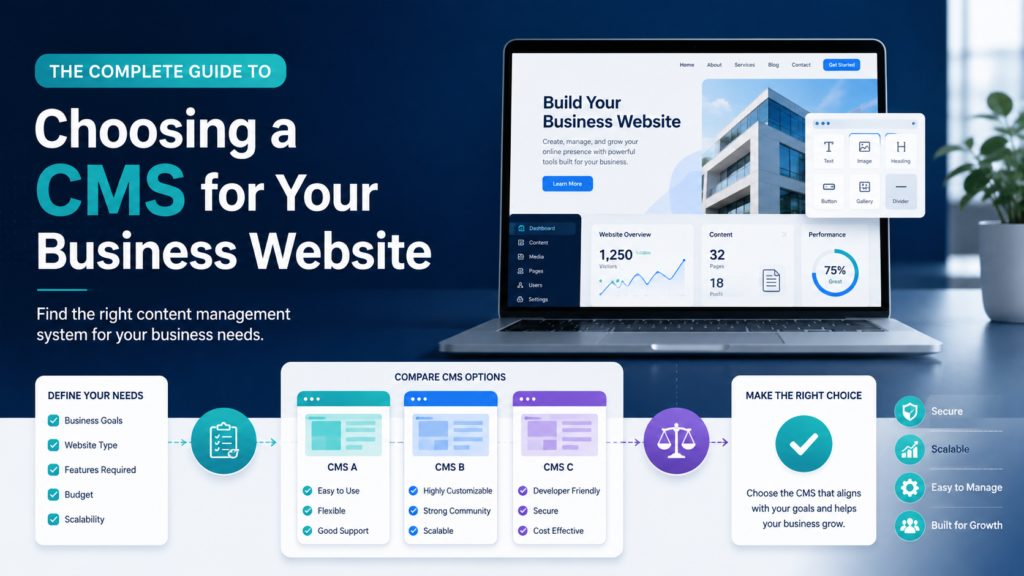
Imagine two businesses launching websites in the same month. Both look polished on day one. Six months later, the first company can publish a new service page in minutes, update staff profiles without calling a developer, connect new leads to its CRM, and add landing pages for campaigns. The second company has to contact its original developer for every small change, struggles to add new content types, and discovers that its platform cannot support the integrations the business now needs.
The difference is not necessarily the design. It is often the content management system (CMS) behind the design. A CMS is the software layer that helps a business create, organize, update, and publish digital content without rebuilding the website every time something changes. Choosing the right CMS therefore affects far more than blogging. It influences marketing speed, operating cost, search visibility, security, ecommerce, integrations, staff productivity, and future redesigns.
This decision matters even more in 2026 because business websites are expected to do more. They may need to support searchable content libraries, online payments, multilingual pages, customer portals, automated marketing, analytics, AI-assisted workflows, and content that can be reused across more than one digital channel. The right CMS should make that growth easier. The wrong one can turn routine changes into expensive projects.
CMS adoption is already mainstream. W3Techs reports that roughly seven in ten websites use a content management system it can identify, with WordPress continuing to hold the largest share. View current CMS usage statistics from W3Techs. Popularity, however, is not the same as suitability. Your business model should choose the platform—not the market-share chart.
At its simplest, a CMS separates the job of managing content from the job of hand-coding every web page. Instead of asking a developer to edit HTML whenever a price, team member, article, location, or service changes, authorized users can work through an administrative interface. Depending on the platform, the CMS can also control media, templates, user permissions, workflows, forms, product catalogs, SEO fields, multilingual content, integrations, and publishing schedules.
This matters because a business website is not a one-time brochure. It is an operating asset. Products change. Staff change. Search behavior changes. Campaigns launch. New markets appear. Regulations evolve. A useful CMS allows the website to move with the business rather than becoming outdated because every update is difficult.
For example, WordPress combines an open-source publishing platform with themes and plugins, while Wix CMS organizes content into collections connected to dynamic site elements. Webflow CMS emphasizes structured visual content management, and Contentful represents a headless approach where content management is separated from the presentation layer.
One of the most common CMS mistakes is beginning with a brand: “Should we use WordPress?” “Is Webflow better?” “Can we build this in Shopify?” Those questions are premature. The correct first question is: What must this website help the business accomplish over the next three to five years?
Once these requirements are clear, platform comparisons become far more meaningful. A simple local-services company and a multinational content-heavy organization should not be expected to make the same CMS choice.
Platforms such as WordPress and Drupal typically combine content management and page delivery in one broad ecosystem. Open-source systems can offer substantial flexibility because businesses can choose hosting, themes, modules or plugins, developers, and custom code. That flexibility can be a major advantage—but it also creates responsibility. Updates, hosting quality, extension selection, backups, performance, and security practices all matter.
WordPress is particularly broad in scope. WordPress.org describes it as suitable for business sites, portfolios, publications, communities, and other types of websites, with functionality extended through themes and plugins.
Hosted platforms such as Wix and Webflow bundle more of the technical environment into one service. Hosting, visual editing, publishing, and many operational tasks are managed within the platform. This can reduce infrastructure complexity and make day-to-day use friendlier for marketing teams. The trade-off is that the business is more dependent on the platform’s supported features, pricing structure, limits, and ecosystem.
Webflow’s 2026 CMS documentation describes collections as structured databases for topics or content types. Wix similarly uses CMS collections and dynamic pages, allowing one design to display many records without manually designing every page.
If selling is the website’s primary job, an ecommerce-first platform may make more sense than forcing a general-purpose CMS to behave like a commerce engine. Shopify, for example, combines storefront creation with product, order, inventory, payment, and multichannel commerce capabilities. For a retailer, these operational features may matter more than having unlimited freedom over every technical detail.
Shopify’s website builder is designed around creating and managing online stores, which is why it should be evaluated differently from a CMS chosen primarily for publishing articles or corporate information.
A headless CMS separates the content repository from the front-end presentation layer. Editors manage structured content in one place, while developers can deliver that content through websites, apps, digital products, or other channels using APIs. This can be powerful for organizations with multiple digital touchpoints or complex technology stacks, but it usually requires stronger development capability than a conventional all-in-one website platform.
Contentful’s headless CMS guide explains this separation between the content backend and presentation layer. For many small businesses, that architecture would be unnecessary. For an enterprise publishing the same product information across a website, app, partner portal, and in-store screens, it may be exactly the flexibility required.
The people who actually manage the website should be able to publish safely without constant developer assistance. Ask editors to test the platform before committing. A technically impressive CMS that frustrates the marketing team can become an expensive bottleneck.
Think beyond pages and blog posts. Can the CMS model services, team members, properties, courses, products, branches, case studies, or other repeatable information as structured content? Strong content modeling reduces duplication and makes redesigns easier.
Some businesses are comfortable with templates. Others need a distinctive brand system, advanced interactions, or unusual layouts. Confirm how much design freedom is available without breaking editor usability or relying on fragile workarounds.
The CMS should let you manage titles, descriptions, headings, URLs, redirects, canonical signals where needed, image alt text, structured content, sitemaps, and crawlable pages. Google emphasizes making content understandable to both users and search engines in its official SEO guidance.
Useful reference: Google Search Central SEO Starter Guide. Google also now provides guidance for website owners on visibility in generative AI features such as AI Overviews and AI Mode. See Google’s AI search guidance
A CMS should not force you into a slow website. Evaluate hosting, caching, media optimization, code output, third-party scripts, and how the site performs as content grows. A beautiful site that becomes sluggish under normal business use is not a successful implementation.
Ask who is responsible for updates, backups, vulnerability management, user access, and incident recovery. Hosted systems shift more platform maintenance to the provider; open-source deployments give you more control but also more operational responsibility.
Your website rarely operates alone. Verify that the CMS can connect cleanly with the systems you already use or reasonably expect to adopt. An integration that requires custom development every time can erase the savings of a cheaper platform.
Scalability is not only traffic. It includes the number of pages, content entries, editors, languages, sites, workflows, products, integrations, and business units. A CMS that works for 20 pages may not be comfortable at 20,000.
Understand what you own and how you can leave. Can you export content? Who controls the domain and hosting account? Is custom code portable? How difficult would migration be? Platform lock-in is not automatically bad, but it should be an informed business decision.
Do not compare only monthly subscription prices. Include design, development, hosting, premium extensions, apps, maintenance, security, support, content migration, integration work, upgrades, and staff time. The cheapest CMS at launch can become the most expensive one to operate.
CMS / Approach | Often a Strong Fit For | Main Strength | Watch For |
WordPress | SMEs, service businesses, publishers, content-rich sites | Large ecosystem; flexible; open source | Plugin quality, maintenance, hosting and security discipline |
Wix | Small businesses and teams wanting an all-in-one system | Ease of use; hosted environment; dynamic CMS tools | Platform-specific limits and long-term portability |
Webflow | Design-led marketing sites and structured content | Visual design control with structured CMS | Complex sites may need specialist Webflow skills |
Shopify | Retailers and ecommerce-first businesses | Commerce operations, inventory, checkout ecosystem | App costs and content needs beyond commerce |
Drupal | Large, complex, governed or enterprise sites | Structured content, permissions, security and extensibility | Higher implementation and specialist skill requirements |
Headless CMS | Multi-channel digital products and composable stacks | Content reuse across channels; developer flexibility | More architecture, development and integration complexity |
WordPress remains a sensible shortlist choice for many business websites because its ecosystem is enormous and the software can be customized in many directions. A local professional-services firm might use it for service pages, location pages, articles, lead forms, case studies, and landing pages. A publisher may value its editorial roots. A developer can extend it far beyond a standard brochure site.
The caution is that “WordPress” is not one standardized implementation. Site quality depends heavily on hosting, theme architecture, plugin selection, update practices, and the people maintaining it. A disciplined WordPress build can be robust; a plugin-heavy site assembled without governance can become difficult to maintain.
Wix can suit smaller businesses that want design, hosting, CMS features, forms, and other website tools under one managed platform. Its CMS collections and dynamic pages can support much more than a five-page brochure. For owners who do not want to manage servers, plugin updates, or a separate hosting stack, that convenience has real value.
The key question is whether the platform still fits if the organization becomes more technically demanding. If you expect unusual integrations, a complex application, or a future architecture that requires full control over the stack, evaluate those needs before choosing convenience today.
Webflow is attractive to businesses that want a visually sophisticated marketing website while still managing structured content. Designers can build reusable systems and editors can work with CMS collections instead of manually duplicating page layouts. In 2026, Webflow expanded its next-generation CMS capabilities, including higher collection-list limits and deeper nesting, which reflects how visual CMS platforms are moving toward more complex content models.
Source: Webflow’s April 2026 CMS update
For an ecommerce-first company, the best CMS decision is often the one that makes products, inventory, checkout, orders, payments, and merchandising easier. Shopify is built around commerce, so it can reduce the amount of custom integration required to turn a general CMS into a store. A content-heavy brand may still need to consider how sophisticated its editorial needs are, but commerce should dominate the decision when revenue transactions are the website’s core function.
Drupal is often considered for complex organizations that need structured content, granular permissions, strong governance, and extensive customization. It can be a strong fit for institutions, public-sector environments, associations, and enterprises where multiple roles and content types must be controlled carefully. It is rarely the simplest option for a small team that only needs basic pages.
Drupal highlights features such as user-access controls and security processes in its official security overview. Drupal CMS 2.0, released in January 2026, also added visual building and AI-related capabilities while retaining Drupal’s enterprise-oriented architecture.
A headless CMS becomes compelling when content is a reusable business asset rather than something tied to one website template. Consider a travel company that wants the same destination data on its website, mobile app, partner portal, and digital signage. Managing four copies of the same information is inefficient. A structured headless repository can serve multiple front ends.
But architecture should solve a real problem. Choosing headless because it sounds modern can create unnecessary cost. If your only requirement is a business website maintained by a small marketing team, a traditional or hosted CMS may be faster, cheaper, and easier to operate.
The firm needs 20–40 pages, articles, staff profiles, lead forms, downloadable guides, and occasional campaign landing pages. It has no internal developer. WordPress, Wix, or Webflow could all be credible choices depending on the desired design freedom and who will maintain the site. A headless CMS would add complexity without solving an obvious business problem.
The retailer’s priorities are products, variants, inventory, promotions, payments, shipping, customer accounts, and integrations with marketing channels. Shopify deserves serious consideration because the commerce engine is central to the requirement. Selecting a generic CMS first and then layering ecommerce onto it may create more operational work than necessary.
The organization manages several brands, thousands of course and campus records, multiple editor roles, localization, structured approvals, integrations, and possibly mobile experiences. Drupal or a headless/composable architecture may deserve a place on the shortlist because governance, structured content, and multi-channel delivery are now more important than the simplicity of a basic page builder.
A CMS does not automatically create strong SEO. The quality of the content, information architecture, internal linking, technical implementation, page performance, and search accessibility still matter. But the platform can either support good practice or make it unnecessarily difficult.
In 2026, businesses should also think beyond classic blue-link search results. Google has published specific guidance for succeeding in generative AI experiences in Search. The underlying message is not to chase a secret “AI SEO” trick; it is to maintain strong technical access and useful, high-quality content that search systems can understand. A CMS that supports clear structured pages, stable URLs, crawlable content, metadata, internal linking, and efficient publishing gives your team a better foundation for both traditional search and newer discovery experiences.
Business owners sometimes ask, “Which CMS is the most secure?” That framing is too simple. Security depends on the platform, hosting, configuration, updates, extensions, passwords, access controls, backups, code quality, monitoring, and operational practices. A secure platform can still be implemented badly.
For open-source systems, establish a clear maintenance process: who applies updates, who reviews extensions, how often backups are tested, and what happens if a vulnerability is announced. For hosted platforms, review the provider’s security responsibilities but do not assume that managed infrastructure eliminates your own duties. User permissions, account security, third-party apps, and data handling still require governance.
A poor CMS choice often does not fail dramatically on launch day. The cost appears gradually: marketing waits for developers, pages are duplicated instead of structured, staff avoid publishing because the editor is confusing, plugins or apps accumulate, performance declines, integrations become fragile, and every redesign requires another workaround.
Eventually the company may face a migration. Migration means more than moving text. URLs, redirects, media, metadata, forms, user accounts, structured data, product information, design components, analytics, and integrations may all need to be rebuilt or mapped. Choosing a CMS with the next several years in mind is therefore a form of risk management.
Area | Question | Decision |
Content | Can it model and manage all important content types cleanly? | Pass / Review |
People | Can the actual editors use it confidently? | Pass / Review |
Marketing | Can the team launch pages and campaigns at the required speed? | Pass / Review |
SEO | Does it support crawlable pages, metadata, redirects, clean URLs, and strong content structure? | Pass / Review |
Commerce | If selling online, are commerce operations native and mature enough? | Pass / Review |
Integrations | Can it connect with critical business systems? | Pass / Review |
Security | Are responsibilities for updates, access, backups, and monitoring clear? | Pass / Review |
Scale | Will it remain practical as content, users, traffic, sites, or markets grow? | Pass / Review |
Ownership | Can content be exported and the business change providers if necessary? | Pass / Review |
Cost | Is the total three-year cost acceptable—not just the launch price? | Pass / Review |
There is no universally “best” CMS. WordPress may be excellent for one business and unnecessarily complicated for another. Wix may give a small team exactly the independence it needs, while a growing organization may require more control. Webflow may be ideal for a design-led marketing operation. Shopify may be the obvious choice when commerce is the core business process. Drupal may justify its complexity where governance and structured enterprise content matter. A headless CMS may unlock multi-channel flexibility—or simply create technical overhead if the business does not need it.
The right decision starts with requirements, not trends. Look at your content, people, integrations, growth plans, security responsibilities, SEO needs, budget, and exit options. Then choose the simplest platform that can meet those requirements reliably without blocking the next stage of your business.
Need help choosing or building the right CMS? KM Marketers can support businesses with CMS selection, website design and development, custom integrations, ecommerce solutions, migrations, and ongoing technical support. The goal is not to push one platform, it is to build a website foundation that fits how your business actually works and can grow with you. |
Your Trusted Marketing Partner!
KM Marketers is a digital marketing solutions provider helping businesses grow through SEO, social media, content marketing, and paid advertising. Our focus is on delivering measurable results, building strong online visibility, and driving quality leads for clients across different industries.
Email: info@kmassignmentservices.com
kmdigitalmarketing2025@gmail.com
WhatsApp: +60 16-522 4321
Head Office: Galleria Cyberjaya, Parking lot, Jalan Teknokrat 6, Cyber 5, 63000 Cyberjaya, Selangor, Malaysia.
Hours: Mon–Sat 10:00 AM to 07:00 PM
© 2026 KM Marketers. Powered by KM Software Services Sdn. Bhd. (1308207-U). All Rights Reserved.