
A practical 2026 guide to getting more reach, consistency and ROI from the content you already worked hard to create
The content multiplier mindset A 30-minute webinar does not have to live and die as one video. With a deliberate system, it can become a LinkedIn article, carousel, short-form video, email, infographic, checklist, FAQ series, quote graphics, sales asset and paid creative – each adapted for the audience and channel. |
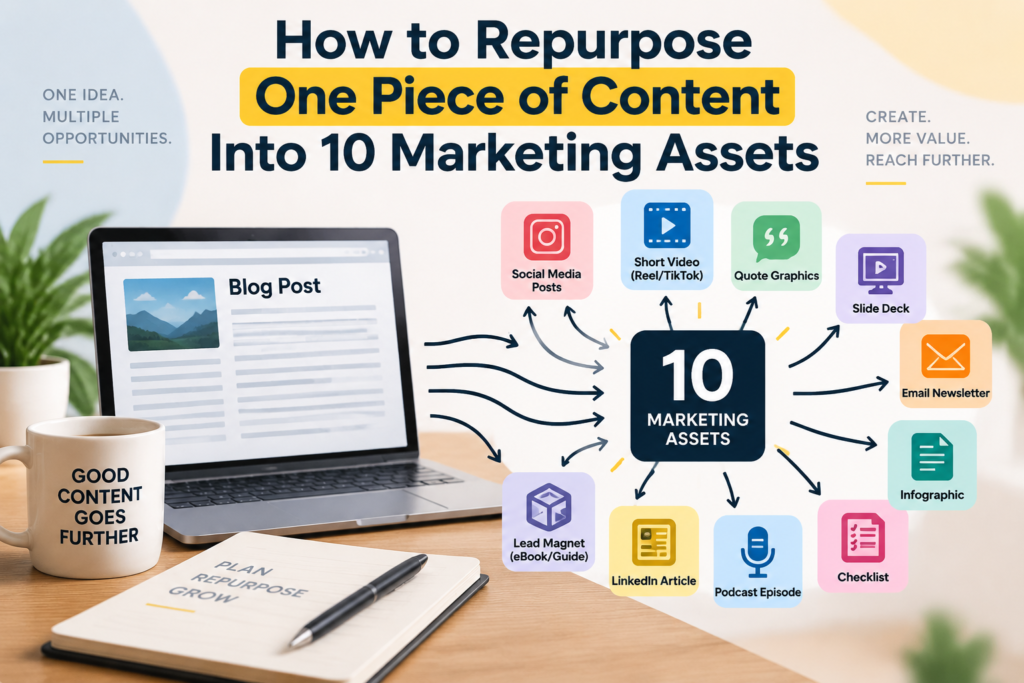
Most marketing teams do not have a content shortage. They have a content-usage problem. A strategist spends hours researching an idea. A subject-matter expert records a webinar. A writer produces a strong article. A designer creates a polished report. The asset is published, promoted for a few days, and then everyone moves on to the next deadline. The best thinking in the business quietly disappears into the archive.
That workflow is expensive because the difficult part of content creation is usually not formatting. It is finding the useful idea, gathering evidence, forming a point of view and explaining it clearly. Once that intellectual work exists, the business should not pay for it only once. Repurposing lets you preserve the core insight while changing the format, angle, length and call to action for different audiences and channels.
This is especially relevant in 2026. HubSpot’s current State of Marketing research lists cross-channel repurposing among the major marketing trends and reports that many teams reuse or adapt content across platforms. The important distinction is adaptation: a LinkedIn audience, an Instagram viewer, an email subscriber and a search visitor may all need the same idea, but they do not need the same execution.
The goal is therefore not to copy and paste one message ten times. It is to build a content system in which one strong source asset becomes a family of useful assets, each designed for a specific job. This guide shows exactly how to do that.
Reposting is distribution: you publish the same or nearly the same asset again. Repurposing is transformation: you preserve the core message but rebuild it for another format, audience, stage of the funnel or channel behavior.
For example, a 1,500-word article about customer retention might contain a useful framework with five causes of churn. On LinkedIn, that framework could become a five-slide carousel with one cause per slide. On YouTube Shorts, it could become a 45-second video explaining the most surprising cause. In email, it could become a short note with one practical diagnostic question. In a sales conversation, it could become a one-page checklist a representative sends after a call.
The idea remains consistent, but the experience changes. That is why good repurposing strengthens brand consistency without making the brand feel repetitive.
Approach | What happens | Best use |
Reposting | The same asset is published again with minimal change. | Reminder posts, evergreen resurfacing, major updates. |
Repurposing | The same core idea is rebuilt into a new format or angle. | Extending reach, matching channel behavior, serving new audiences. |
Content atomization | A large asset is deliberately broken into multiple small, reusable components. | Campaign planning, social series, sales enablement, ongoing content libraries. |
Content amplification | Multiple channels are coordinated to increase the reach and life of a strong idea. | Launches, reports, webinars, thought leadership and major campaigns. |
Audiences now discover brands across fragmented journeys. One person may find you through search, another through a LinkedIn post, another through a Reel, another through an email forward, and another through an AI-generated answer that was influenced by content published across the web. Expecting one format to serve every discovery path wastes reach.
HubSpot’s 2026 State of Marketing report notes that 49.4% of teams reuse the same content across platforms, while 39.5% tailor content for each platform. The more useful lesson is not the exact split; it is that channel-specific content is increasingly important. Repurposing works best when the brand keeps the core message but changes the packaging for the way people actually consume information in each environment.
Technology also lowers the mechanical cost of transformation. AI tools can help extract key points, propose captions, create first-draft scripts, summarize transcripts and resize or reformat creative. HubSpot’s Content Remix, for example, is explicitly designed to turn existing content into multiple formats. But faster production increases the need for human review, not the opposite. Someone still needs to protect accuracy, brand voice, context, copyright, tone and the strategic purpose of each asset.
Useful source: HubSpot – 2026 State of Marketing
Not every piece of content deserves to become ten assets. The source should contain enough substance to survive transformation. A thin announcement may only support two or three follow-up posts. A strong webinar, report, guide, case study, interview, podcast episode or long-form article can support much more.
A useful source asset usually has four qualities: it answers a real customer question, contains several distinct ideas, includes evidence or examples, and connects naturally to a business objective. The strongest repurposing candidates are often assets that already performed well or that address questions sales teams hear repeatedly.
Imagine a B2B software company records a 30-minute webinar called “Five Ways to Reduce Customer Onboarding Time.” The webinar includes an opening story, five recommendations, a before-and-after example, three common mistakes and a short Q&A. That is not one asset. It is a library of raw material.
The team first creates a clean transcript, identifies the strongest claims and examples, checks every factual statement, and marks moments that can stand alone. From there, the source can be rebuilt into ten distinct marketing assets.
Turn the core webinar into a structured article that can be discovered long after the event ends. Do not simply paste the transcript. Remove conversational repetition, add descriptive headings, clarify examples, include relevant internal links and answer the questions a search visitor would expect. A webinar audience may tolerate context before the answer; a search visitor usually wants the answer quickly.
For the onboarding example, the blog could become “5 Ways to Reduce Customer Onboarding Time Without Adding Headcount.” Each webinar recommendation becomes a section, the Q&A becomes an FAQ block, and the before-and-after story becomes a worked example. The article then becomes the central destination that many of the other assets can link back to.
LinkedIn is useful when the idea has a professional, industry or leadership angle. Instead of copying the blog, rewrite the opening around a workplace observation, business tension or contrarian insight. Keep the language more conversational and make the lesson relevant to decision-makers who are scrolling between meetings rather than actively searching for a tutorial.
LinkedIn allows members and eligible Pages to create newsletters that people can subscribe to and receive notifications about. That makes a recurring series useful for turning one broad research theme into several editions over time. Your original webinar could become a newsletter edition focused only on the most expensive onboarding mistake, with the full guide linked at the end.
A carousel forces the idea into visual sequence. Start with one clear promise, use one thought per slide, and make the final slide tell the reader what to do next. Avoid shrinking paragraphs onto slides. The purpose is not to reproduce the article visually; it is to make the logic scannable.
For example: Slide 1 – “Why onboarding takes too long.” Slides 2-6 – one fix each. Slide 7 – a before-and-after workflow. Slide 8 – a checklist. Slide 9 – the call to action. The carousel can educate someone who never watches the webinar while still reinforcing the same campaign theme.
Choose one insight that can stand on its own and script it around a strong first sentence. Short-form video should not feel like a compressed webinar. It needs a fast hook, one focused point, visual movement and a clear ending. You can use the original speaker, cut an existing video clip, or record a fresh vertical explanation based on the source.
YouTube explicitly supports turning existing long-form videos into Shorts, and the resulting Short can link viewers back to the original video. Meta likewise recommends creative built for the vertical Reels environment rather than simply reusing horizontal assets unchanged. Repurposing therefore works best when the idea is reused but the creative is native to the placement.
Email gives you permission to be more direct. Select one practical takeaway, explain why it matters, and give the subscriber one next step. The email does not need to summarize all five webinar points. Its job may be to create curiosity and move the reader to the article, recording, consultation or download.
A strong version might open: “Most onboarding delays are not caused by the customer. They are caused by internal handoffs.” The email then explains one example in 150-250 words and links to the full guide. That feels useful on its own while still driving traffic to the larger campaign.
If the source includes a process, comparison, hierarchy, timeline or set of numbers, turn that structure into a visual. Infographics work because they help people understand relationships quickly. They are especially useful in presentations, blogs, social posts, sales emails and internal training.
The onboarding webinar could become a “Before vs After Onboarding Workflow” infographic: five handoffs on the left, three simplified stages on the right, with the time saved at each stage. Keep the design focused on the idea rather than decorating every empty space.
Instead of publishing one giant summary, create a sequence of smaller posts. One post may challenge a common assumption, another may share a statistic, another may tell the customer example, another may answer a question from the webinar, and another may ask the audience which obstacle they face.
A five-post series lets the brand stay on one strategic theme for several days or weeks without repeating the same copy. It also creates a useful feedback loop: comments on the early posts can reveal which angle deserves a longer follow-up asset.
Strong source content usually contains memorable lines, frameworks or data points. Extract the best ones and turn them into simple branded graphics. The quote should carry a real idea; avoid generic motivational phrases that could belong to any brand.
For example: “Every manual handoff is a place where onboarding can stop.” That line can become a visual post accompanied by a caption that explains the operational lesson. A second card might show a useful statistic from the source, provided you have verified the number and retained the original context.
Some content becomes more valuable when the audience can use it. Convert the advice into a practical tool: a checklist, worksheet, audit sheet, template, scorecard or mini playbook. This shifts the content from information to action and can support lead generation when the resource is useful enough to justify an email sign-up.
The onboarding webinar could become a one-page “Customer Onboarding Friction Audit” with 12 yes/no questions. A prospect can complete it in five minutes, identify weak points and then book a conversation if the result reveals a problem. The intellectual foundation came from the webinar, but the asset serves a very different job.
The final repurposed asset can support conversion rather than reach. Pull the strongest pain point, proof point or outcome into a paid ad, retargeting message, sales one-pager or presentation slide. Because the campaign already has educational content, the promotional asset does not need to explain everything. It can focus on one reason to act.
For example, a retargeting ad could use the line “Still onboarding customers through five disconnected handoffs?” and link to a demo. A sales representative could use the before-and-after workflow slide in a proposal. Repurposing becomes most valuable when content supports the full customer journey, not only top-of-funnel awareness.
Asset | Primary job | Best channel(s) | CTA example |
Blog article | Search + education | Website / Google | Read the full guide |
LinkedIn article/newsletter | Thought leadership | Subscribe / visit site | |
Carousel | Saveable education | LinkedIn / Instagram | Save or share |
Short video | Reach + attention | Reels / Shorts | Watch full version |
Nurture | Email list | Read / reply / book | |
Infographic | Fast understanding | Website / social / sales | Download / share |
Social series | Repeated exposure | LinkedIn / Instagram / Facebook | Comment / engage |
Quote cards | Brand recall | Social media | Share / learn more |
Checklist / lead magnet | Lead generation | Landing page / email | Download |
Paid or sales asset | Conversion | Ads / sales deck | Book / buy / demo |
Every derivative asset should answer three questions: Who is seeing this? What are they doing on this channel? What action do we want next? If those answers change, the format should probably change too.
A carousel needs a visual story. A short video needs a hook. An email needs a reason to open and click. A search article needs depth and structure. A LinkedIn post needs a conversational entry point. Paid creative needs a clear offer and proof. The core idea can be identical while the execution is completely different.
This is also why copying identical captions across every platform is usually weak repurposing. It saves minutes, but it can reduce relevance. HubSpot’s 2026 research explicitly highlights the difference between reusing content and tailoring it for each platform. The best workflow uses repurposing to save strategic effort, then reinvests some of that saved time into channel fit.
AI is well suited to the mechanical parts of repurposing: transcript cleanup, first-pass summaries, headline options, caption variations, clip suggestions, outline generation and format conversion. HubSpot’s current Content Remix tools are one example of how marketing platforms are building this workflow directly into content systems.
The danger is treating AI output as finished work. A model may flatten your brand voice, repeat the same obvious phrasing, remove important caveats or invent details when the source is unclear. The more assets you create from one source, the more quickly one error can spread across ten channels.
Use AI as an accelerator around a verified source. Keep a human approval step for factual claims, customer stories, statistics, regulated topics, brand promises and any language that could create legal or reputational risk. The efficiency comes from reusing trusted thinking, not from publishing unchecked volume.
Week | What to publish | Why it works |
Week 1 | Publish source asset + short launch post + email | Creates one central destination and initial reach. |
Week 2 | Carousel + short-form video + quote card | Repackages the idea for visual and video discovery. |
Week 3 | LinkedIn article/newsletter + social discussion post | Adds a professional thought-leadership angle and conversation. |
Week 4 | Checklist/lead magnet + paid retargeting or sales asset | Moves interested audiences from education toward action. |
Repurposing should improve more than output volume. The real test is whether the same core investment creates more useful customer touchpoints, longer content life and better commercial outcomes.
Track performance by the job of each asset. Search articles can be judged by impressions, clicks, rankings, engaged sessions and assisted conversions. Short videos can be judged by watch time, completion, shares and profile or site actions. Emails can be judged by clicks, replies and downstream conversions. Lead magnets should be judged by qualified downloads and what those leads do next. Paid derivatives should be judged by cost per result and conversion quality.
Also track production efficiency. If one source asset produces ten usable derivatives in 30% less time than creating ten independent pieces from scratch, that operational gain matters. But do not celebrate efficiency if quality or performance collapses. The best system improves both output efficiency and audience relevance.
Asset type | Primary metrics | Secondary signal |
Blog / SEO | Organic clicks, engaged sessions, conversions | Backlinks, assisted conversions |
Short video | Watch time, completion, shares | Profile visits, site clicks |
Clicks, replies, conversion | Forwarding, unsubscribe rate | |
Carousel / social | Saves, shares, meaningful comments | Follower/profile growth |
Lead magnet | Qualified downloads, MQLs, bookings | Completion/use rate |
Paid derivative | Cost per lead/sale, ROAS, conversion rate | Creative fatigue, frequency |
The biggest benefit appears when repurposing becomes part of content planning before the source asset is created. If you know a webinar will later become a carousel, article, email and checklist, you can capture the material differently. Ask quotable questions. Record clean video. Collect supporting examples. Design charts that can be reused. Build the source in modular sections. This makes downstream production faster and improves quality.
Create a simple repurposing brief for major content: the core message, target audience, proof points, approved claims, key quotes, visual opportunities, possible channel formats and the primary CTA. Then assign ownership. A writer may own the blog and email. A designer may own carousels and infographics. A video editor may own clips. A performance marketer may turn the strongest message into ads. Everyone works from the same approved source.
The result is a campaign that feels coordinated because the brand is repeating the same strategic idea in different useful ways. Repetition is not the enemy in marketing. Meaningless repetition is. Customers often need to encounter an idea several times before they remember it, trust it or act on it. Repurposing lets you create that repetition without forcing them to consume the same format again and again.
A good piece of content should not be treated like a disposable post. If the idea is valuable, give it more than one chance to reach the right person. Turn depth into short-form attention. Turn video into searchable text. Turn education into a checklist. Turn insight into sales support. Turn the strongest organic message into paid creative. The source asset becomes the strategic center, while each derivative does a different job.
The most effective content teams in 2026 will not necessarily be the teams publishing the highest number of completely new ideas. They will be the teams that identify their best ideas, adapt them intelligently, distribute them across the right channels and keep learning from the formats that perform.
If your business has useful ideas but struggles to turn them into a consistent stream of high-quality marketing assets, KM Marketers can help build the system around them. From content strategy and SEO-focused articles to social media posts, carousels, creative design and campaign planning, the aim is to help one strong idea travel further without losing its meaning or your brand voice. The best content strategy is not about creating more for the sake of more; it is about getting more measurable value from the content worth creating in the first place.
CREATE ONCE. ADAPT INTELLIGENTLY. DISTRIBUTE WITH PURPOSE.
Your Trusted Marketing Partner!
KM Marketers is a digital marketing solutions provider helping businesses grow through SEO, social media, content marketing, and paid advertising. Our focus is on delivering measurable results, building strong online visibility, and driving quality leads for clients across different industries.
Email: info@kmassignmentservices.com
kmdigitalmarketing2025@gmail.com
WhatsApp: +60 16-522 4321
Head Office: Galleria Cyberjaya, Parking lot, Jalan Teknokrat 6, Cyber 5, 63000 Cyberjaya, Selangor, Malaysia.
Hours: Mon–Sat 10:00 AM to 07:00 PM
© 2026 KM Marketers. Powered by KM Software Services Sdn. Bhd. (1308207-U). All Rights Reserved.